Overview
Agentforce Coworker is Salesforce’s out-of-the-box agent, an AI teammate that answers everyday questions using connected, permissioned context from an org’s existing systems. It reasons across sources to find trusted answers and orchestrates tasks for specialized agents when a request needs action. Built for every business user, not just admins or developers, it is the front door to an org’s agent workforce, replacing scattered searching with instant answers that let people move faster.
Powered by Data 360, currently in Beta. Included in Enterprise, Unlimited, Agentforce 1 Editions, and Salesforce Foundations.
How It Works: Discover, Analyze, Act
- Discover: user asks a plain-language question; Coworker searches connected, permissioned sources.
- Analyze: synthesize findings into a business answer, not a raw list of records.
- Act – routes tasks beyond information to the right Agentforce agent.
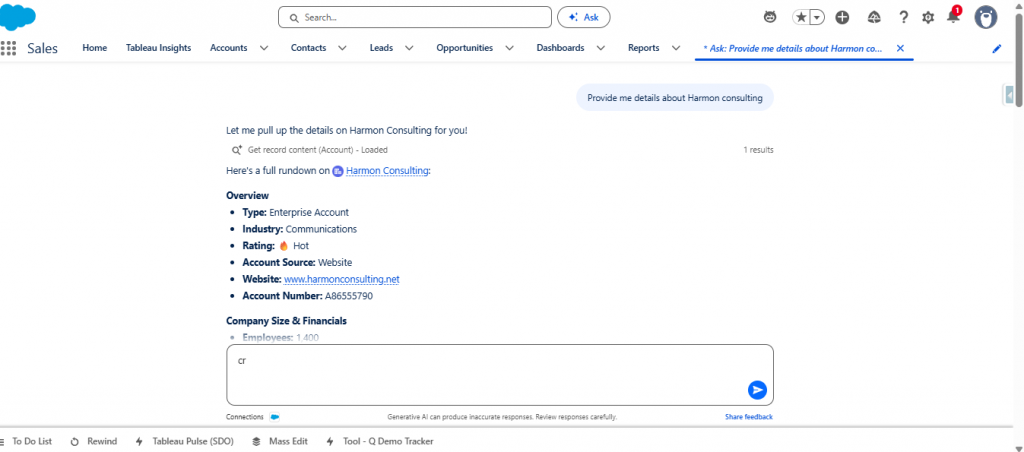
Two Modes, One Interface: Search vs. Ask
- Search Mode (Default): Surfaces unified generative insights directly within the Global Search interface. It captures user intent from standard search queries and dynamically processes, evaluates, and displays CRM data.
- Ask Mode: Initiates multi-turn conversational AI via a dedicated interface button. Users can explicitly query CRM data, such as Accounts, Contacts, and Knowledge articles, for direct, targeted answers.
- Both Modes: Operate natively on the Data 360 platform. They strictly enforce your org’s existing sharing models, metadata definitions, and user permissions from Day 1.
Curated Access, Not Automatic Discovery
Coworker does not automatically see or use every agent, Flow, or action in the org. Admins must deliberately expose and scope each agent – its questions, data sources, and permitted actions. Salesforce: “The more specific you are, the more reliable the experience will be.”
- The coworker never calls Flows/Apex directly; it routes to an agent, whose own configured actions do the work.
- Chain: User → Coworker → matched agent → agent’s Flow/Apex/action, always under the requesting user’s own permissions.
- Even if an agent is exposed org-wide, invocation only works for users who are separately granted access to it; otherwise, it fails or is withheld.
Search Sources: CRM vs. Slack
CRM is the only source searched by default, native, semantically indexed into Data 360, always on, inheriting existing Salesforce sharing rules.
Slack is optional and federated: accessed live at query time (not indexed/copied), added after setup, permission-enforced at the Slack layer, so users see only what they could already see in Slack. Google Drive/SharePoint requires pilot enrollment via your Account Executive, not self-service during Beta.
Getting Set Up
Prerequisites
Category | Requirement | Critical Details |
Org Edition | Enterprise, Unlimited, Agentforce 1, or Foundations | An essential platform base is required to house infrastructure. |
Licensing | Admin Permission Set + Setup License | Grants full architectural rights to configure backend frameworks. |
Personnel Roles | Data 360 Admin/Architect & System Admin | Requires a Data 360 Admin to handle modeling and a System Admin to turn on the feature. |
Core AI Settings | Einstein Enabled | The initialization flow automatically flips this toggle on. |
Data Cloud Is Supporting Insurance Transformation
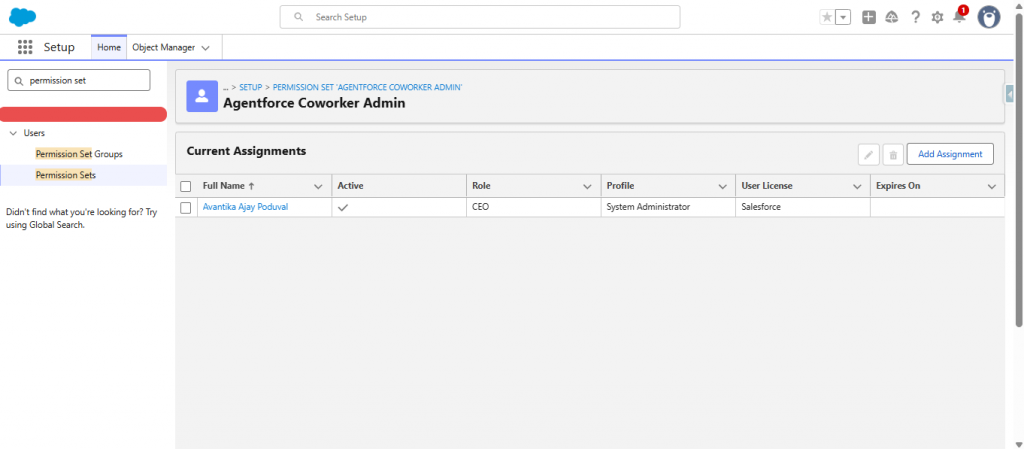
1. Assign yourself permissions: Admin permission set (Agentforce Coworker Admin) and set up a license.
Assigning this permission set tells Salesforce to automatically attach the required Agentforce Coworker Setup permission set license to your account behind the scenes.
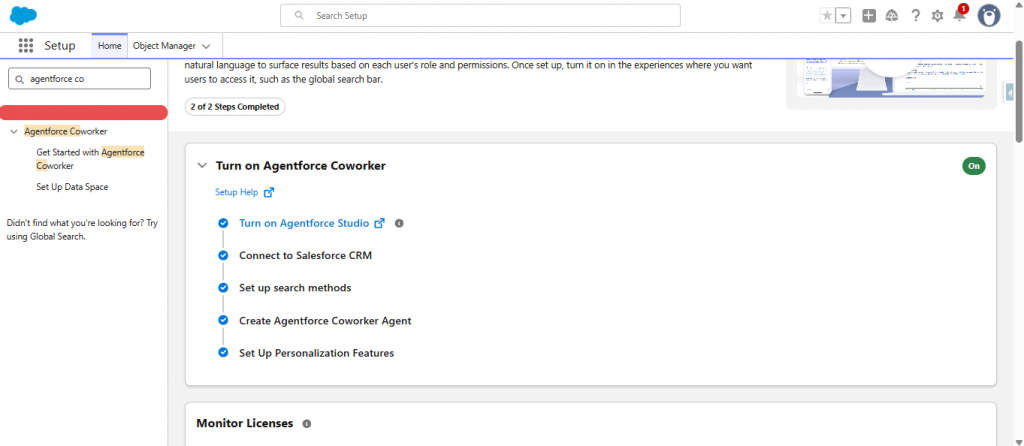
2. Turn it on – Setup → “Agentforce Coworker” → Get Started → Turn On → Confirm. Automates enabling the Agentforce Platform, connecting CRM data, configuring search, provisioning the search agent, and enabling personalized results.
Note: For CRM-only search scenarios, no separate Data 360 setup is required. The setup wizard automatically provisions the CRM connection as part of the Coworker activation flow.
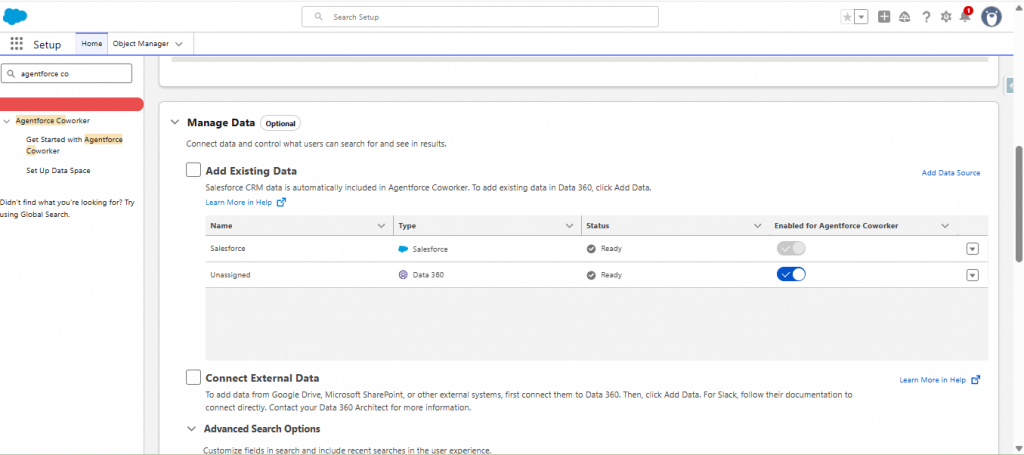
3. Connect data sources – under Manage Search Data: add Data 360 sources, connect external ones if piloting, toggle sources anytime, enable Recent Searches.
Additional sources: Data sources beyond CRM and Slack are connected through Data 360. Processing and indexing data from these sources consumes Data 360 Flex Credits or Data Services Credits.
4. Turn on the end-user experience – Setup → Turn on End User Experience → Manage → review disclaimers → check consent → Turn On, making Coworker visible in global search for granted users.
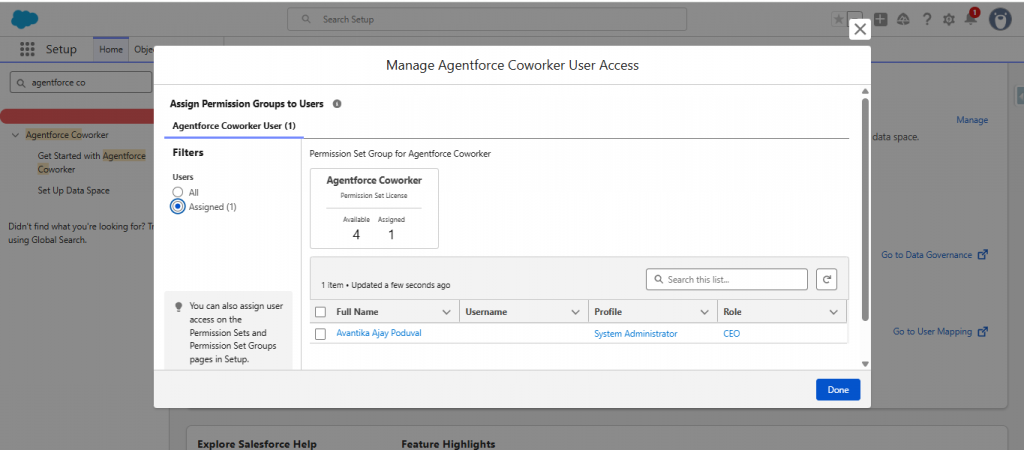
5. Grant user access – Manage Agentforce Coworker Users → select users → Assign → Done. Each needs the User permission set (Agentforce Coworker User).
6. Build/expose agents – separate what users need to know (trusted data source) from what they need to do (scoped agent).
Best practice: listen to what users actually ask before configuring anything, informally “SABWA” (Salesforce Administration By Walking Around). A coworker is only as useful as the sources and agents connected to real, recurring needs.
Data 360: auto-provisions once a Data Cloud license exists on the org; manual enablement only needed without auto-provisioning, or in a Developer Edition/sandbox org. Foundational to Agentforce-family features, not optional.
Security & Governance
- Runs as the user: every action executes under the requester’s permissions, not an elevated service account.
- Source-governed access: Salesforce answers are filtered by existing record permissions, and external sources enforce their own access controls.
- Encryption & zero retention: processed via the Einstein Trust Layer with zero data retention at the model layer, prompts/responses never train underlying models.
- Masking is off, not on: unlike tools that mask sensitive fields before the AI sees them, masking is deliberately off since it blocks accurate reasoning. Protection comes from in-transit encryption, zero retention, and the AI only seeing what the user already can.
- Auditability: built-in session tracing shows what Coworker saw, decided, and did.
Licensing & Billing
- Unmetered – A1E(Agentforce 1 Edition) or A4X(Agentforce for Sales/Service Add-on) customers: Coworker included at no extra cost, unlimited usage, no Flex Credits consumed regardless of mode.
- Metered – Foundations Flex customers: Coworker consumes Flex Credits (FC) per mode:
For current rates and plan details, see Salesforce’s official pricing page: https://developer.salesforce.com/docs/data/agentforce-coworker/guide/agentforce-coworker-billing-considerations.
Pricing has shifted before and may again, so also check your org’s Digital Wallet for exact, live consumption.
- CRM/CRM+Slack search consumes no credits under seat-based access (with correct AI permissions); guest/unauthenticated/portal users are always usage-based; sources beyond CRM/Slack always consume credits.
Key Considerations
- Not available on lower-tier editions during Beta.
- No personalized instructions can be layered on Coworker via Agentforce Studio.
- Non-CRM/Slack sources require pilot enrollment rather than self-service.
- Routing reliability depends on agent scoping (via description/scope fields); vague scopes cause misrouting.
- Can’t prioritize email types in follow-up sequences.
- Content in an unconnected source is invisible to Coworkers.
- Coworker can’t perform CRUD operations on its own – it must route to a separately connected, provisioned agent; Coworker only reasons and orchestrates.
- The Search Agent looks editable in Builder, but changes don’t take effect at runtime – unsupported customization. Builder allows editing only as shared tooling; the restriction is runtime-enforced. If routing to a record-action agent is unreliable, naming it via Ask mode is the more deterministic fallback.
Outcome
With Coworker properly scoped and connected, users get one trusted place to ask questions and get real, permissioned answers, plus a governed path to hand off actual work to the right agent, without stepping outside their own Salesforce access.
Authors:
Arushi Soni & Avantika Poduval