Introduction
For years, the Salesforce developer community has been asking for one thing: the freedom to use modern frontend frameworks natively on the platform. With the open beta of Salesforce Multi-Framework, that wait is over. You can now build native Salesforce apps in React, with authentication, security, and governance built in.
To put this release through its paces, we built a proof-of-concept: the Sales Pipeline Intelligence Dashboard. It runs as a React 19 SPA paired with GraphQL inside a Salesforce scratch org, absolutely no LWC, no Apex, no SLDS and no SOQL.
Repository: https://github.com/hegdesumanth/sf-multiframework-react-graphql
Official announcement: Build with React, Run on Salesforce
This blog walks through what’s actually new, what the POC demonstrates, and where the trade-offs lie.

The Problem & Context
Building on Salesforce traditionally meant committing fully to Lightning Web Components (LWC) or Aura. You got base components, declarative tools, and Lightning Data Service, but you gave up the broader frontend ecosystem. Open-source libraries had to be wrapped as static resources, and there was no clean way to bring your own framework without losing platform features.
Multi-Framework changes that math. It’s a framework-agnostic runtime on the Agentforce 360 Platform that lets React apps run natively while still respecting FLS, CRUD, and sharing rules. React is supported today; Vue and others are on the roadmap.
Two related shifts matter:
- @salesforce/sdk-data :- a new SDK for GraphQL, Apex, and UI API access, built specifically for React.
- Winter ’26’s lightning/graphql module :- supersedes the older lightning/uiGraphQLApi for LWC, adding optional fields and dynamic queries.
In other words, Salesforce isn’t just adding React support, they’re modernising data access across the board.
What the POC Demonstrates
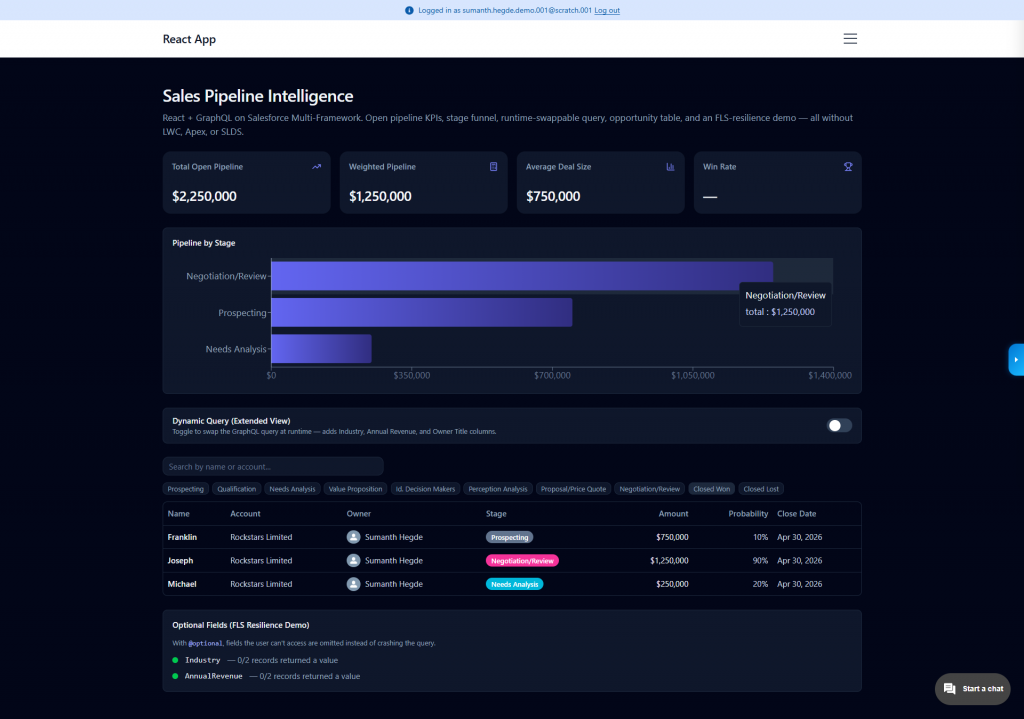
The dashboard surfaces five sections: KPI cards, a stage funnel, a dynamic query toggle, an opportunity table, and an optional-fields demo panel. Each one highlights a specific platform capability that was previously awkward or impossible.
1. Dynamic Query Construction at Runtime
This is the headline differentiator. With LWC’s @wire, the query string must be known at compile time:
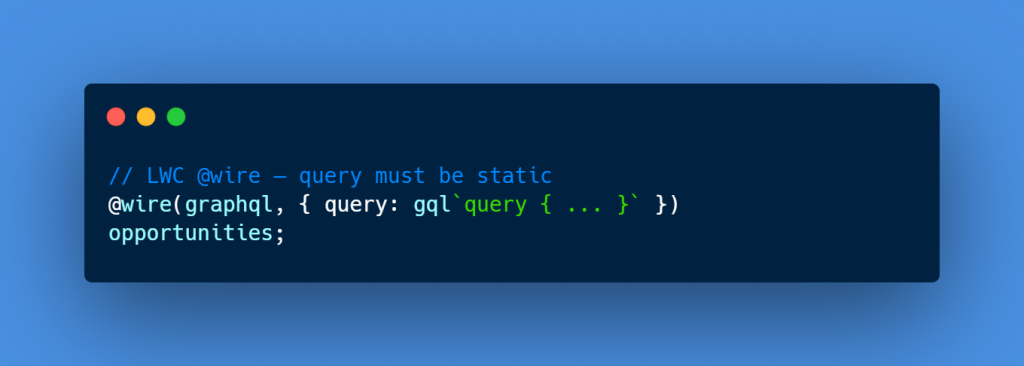
With Multi-Framework, you simply pick the query string at runtime:
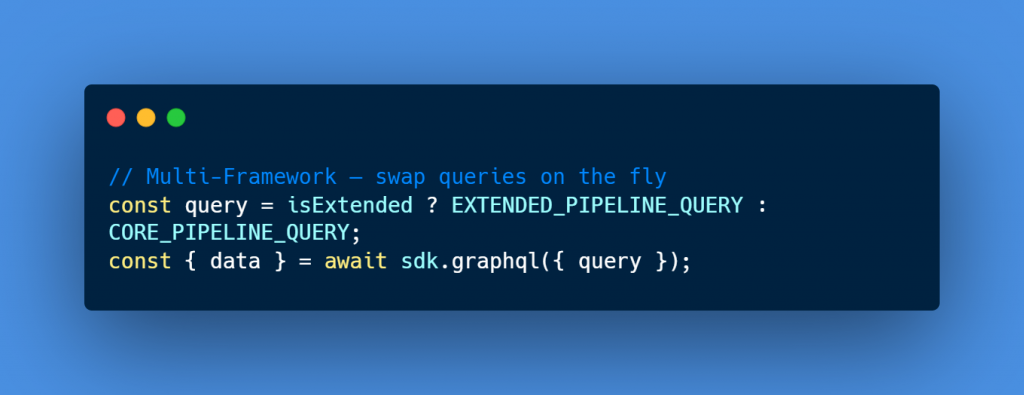
In the POC, a single toggle flips between a “core” query (Opportunity + Account.Name + Owner.Name) and an “extended” query that adds Industry, Annual Revenue, and Owner Title. No re-mount, no Apex workaround, no fragment gymnastics.
2. Graceful FLS Handling with @optional
Field-Level Security has long been a sharp edge for GraphQL: a single inaccessible field would fail the entire query with FIELD_NOT_ACCESSIBLE. The @optional directive changes that. Inaccessible fields are silently omitted from the response.
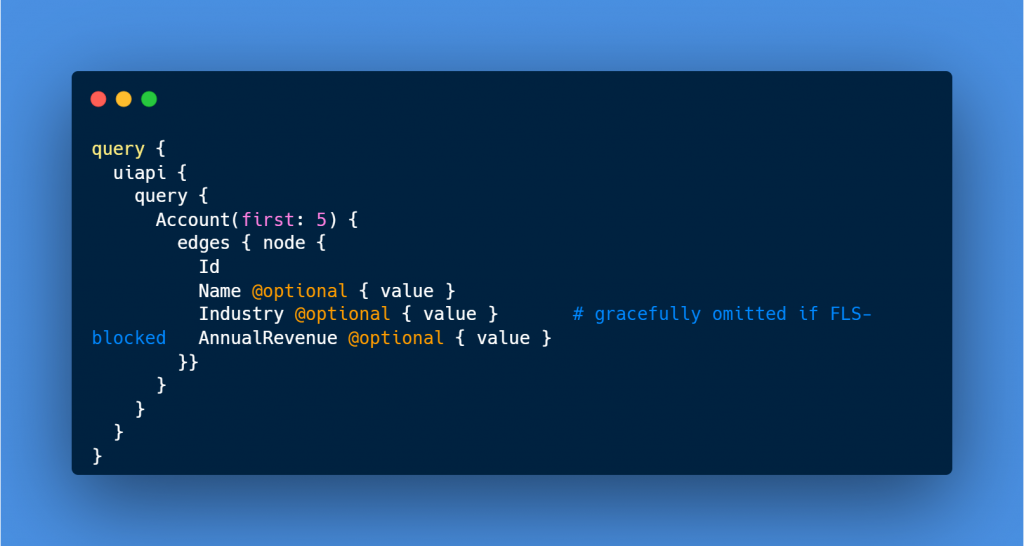
The Optional Fields panel in the POC classifies each field as resolved, skipped, or error and renders a colored status dot per field, proving the query survives partial FLS access in production-like conditions.
3. The npm Ecosystem, Without the Static-Resource Dance
Recharts, shadcn/ui, lucide-react, date-fns, sonner, all installed via plain npm install. No static resource manifests, no manual loader scripts, no CSP gymnastics for first-party libraries.
npm install recharts
That single line replaces what used to be a multi-step ritual just to render a chart inside Salesforce.
Architecture Overview
The repo is a Salesforce DX project containing a Vite + React UI Bundle. The structure mirrors any modern React app:
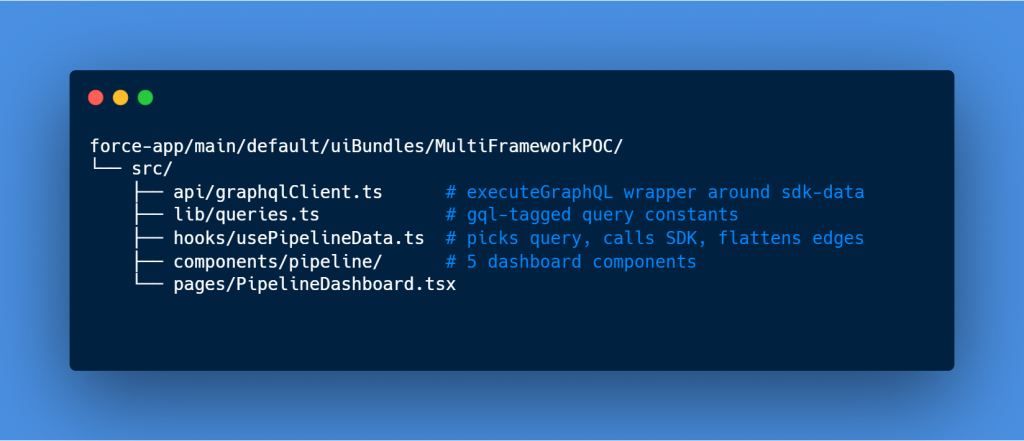
A custom hook owns the data lifecycle:
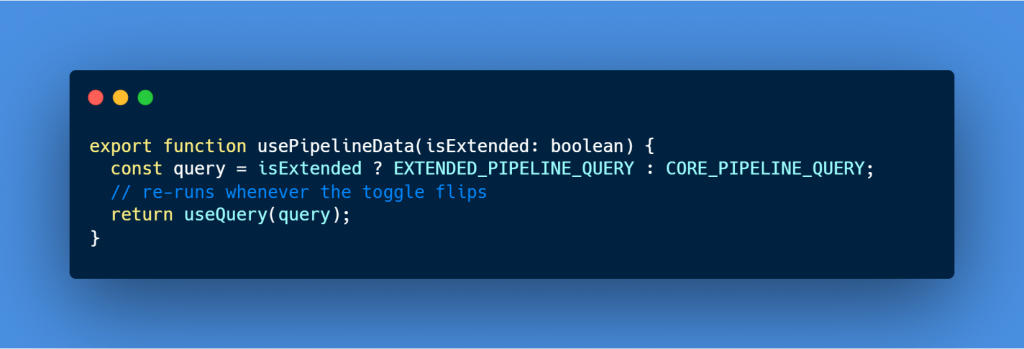
A custom hook owns the data lifecycle:
Bonus: Two More GraphQL Relationship Routes
Beyond the Pipeline Dashboard, the POC ships two additional routes that explore GraphQL relationship traversal; one in each direction. They are the cleanest way to feel how GraphQL replaces classic SOQL parent/child query patterns, and both fetch their data in a single round trip.
/opportunities - Child-to-Parent Lookup
This route fetches a flat list of Opportunities and reaches up into each parent Account in the same query; no second round trip, no manual join, no separate @wire for the Account record:
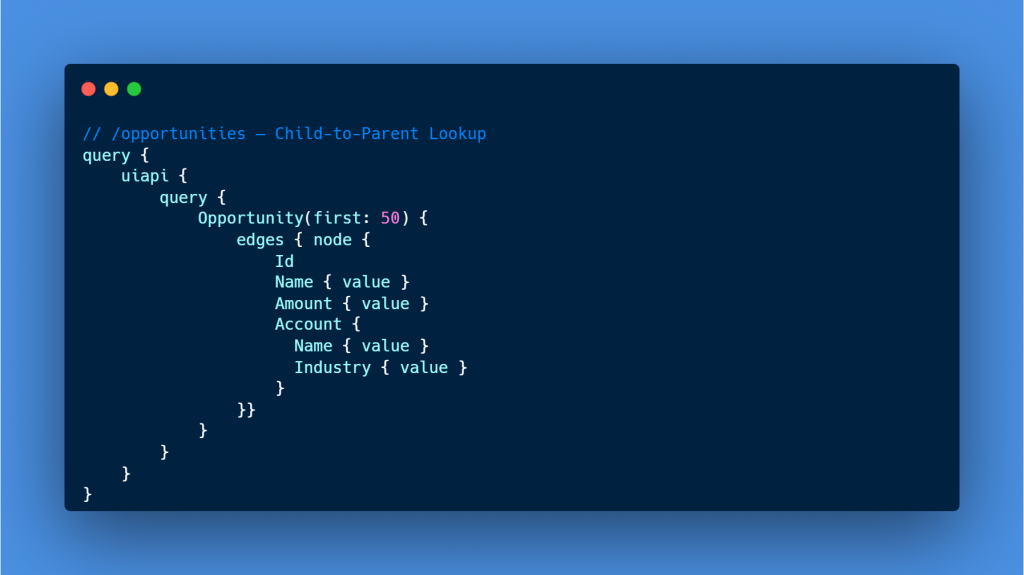
SOQL equivalent: SELECT Name, Amount, Account.Name, Account.Industry FROM Opportunity. The page renders a flat opportunity table with the parent Account name and industry inline, proving GraphQL collapses the typical multi-@wire choreography into a single SDK call.
/accounts-with-opps - Parent-to-Child Sub-Query
This route inverts the relationship. It queries Account and uses the Opportunities child relationship name to pull each account’s opportunities as a nested collection. The GraphQL equivalent of a SOQL sub-select:
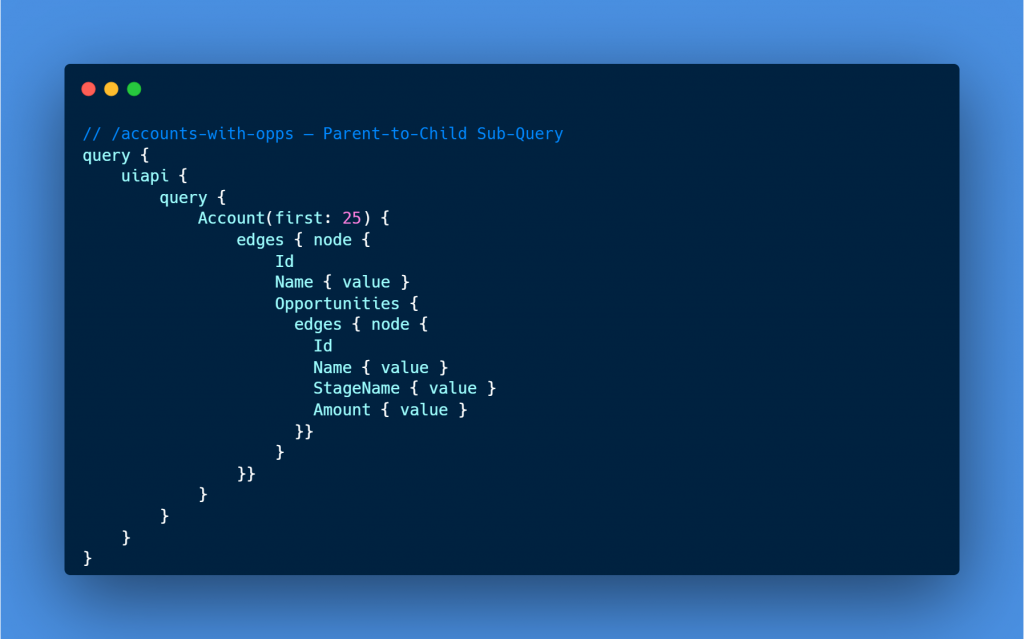
SOQL equivalent: SELECT Name, (SELECT Name, StageName, Amount FROM Opportunities) FROM Account. The UI renders an expandable account row that drills into nested opportunities on demand. Same single round trip story, with the relationship cardinality flipped.
Together, these two routes show GraphQL traversal in both directions of the same relationship. In LWC land, the parent-to-child case typically forces a custom Apex method or a SOQL sub-select wrapped in @AuraEnabled. With @salesforce/sdk-data, it is just GraphQL, same SDK call, different shape.
Try It Yourself: Spin Up Your Own React App on Salesforce
You don’t need our repo/template/boilerplate to get started. Salesforce ships an official React template that scaffolds the exact stack we used: TypeScript, Vite, React 19, Tailwind, shadcn/ui, and @salesforce/sdk-data preconfigured. This is the runbook we followed to bootstrap the POC, with the same commands you can run on your own machine.
Prerequisites
- Salesforce CLI (latest version).
- Node.js v18 or later (v22+ recommended) and npm.
- A scratch org or sandbox with English as the default language. Multi-Framework beta is not available in production orgs, Developer Edition orgs, or Trailhead Playgrounds.
- VS Code with the Salesforce Extension Pack and Agentforce Vibes – recommended for the best scaffolding experience.
Step 1:- Enable the Multi-Framework Beta in Your Org
Multi-Framework is opt-in. Turn it on in your target org(Sandbox or Scratch Org) first:
- Open Setup → Quick Find: Salesforce Multi-Framework
- Click React Development with Salesforce Multi-Framework (Beta)
- Click Enable Beta and confirm.
Step 2:- Authorize Your Org
Connect the Salesforce CLI to a sandbox, or spin up a fresh scratch org:
# Authorize an existing sandbox or scratch org
sf org login web –alias myorg –instance-url https://test.salesforce.com
# OR create a fresh scratch org (Dev Hub required)
sf org create scratch -f config/project-scratch-def.json -a myorg -d -y 7
Step 3:- Scaffold the React App
There are two ways to generate the boilerplate. Either path produces the same preconfigured scaffold, then customize from there.
Option A : Agentforce Vibes (recommended)
- Open VS Code with the Agentforce Vibes extension installed.
- On the Vibes Welcome screen, click the React App tile and choose Internal App (employee-facing).
- Vibes scaffolds the SFDX project, the UI Bundle folder, and all React + GraphQL plumbing in one shot.
Option B : SFDX CLI
Prefer the terminal? From your project root:
sf template generate ui-bundle
This drops a starter React app at force-app/main/default/uiBundles/<YourBundleName>/.
Option C : VS Code Command Palette
Already inside VS Code? Use the built-in project creation flow.
- Open the Command Palette (Ctrl+Shift+P on Windows / Cmd+Shift+P on macOS).
- Run SFDX: Create Project.
- Choose the React Internal App template from the list.
- Name your project, VS Code scaffolds the SFDX project, the UI Bundle folder, and the same React + GraphQL plumbing in one shot.
Step 4: Install Dependencies and Run Locally
All npm scripts run from inside the UI Bundle directory, not the repo root:
cd force-app/main/default/uiBundles/<YourBundleName>
npm install # installs React, Vite, sdk-data, shadcn/ui, Tailwind
npm run dev # local dev server at http://localhost:5173
Open http://localhost:5173
The boilerplate ships with a sample home page and an example GraphQL query you can tweak to feel out the SDK.
Step 5: Build and Deploy to Your Org
When you’re ready to push the app into Salesforce itself:
# From the UI Bundle directory
npm run build
# From the repo root
sf project deploy start –source-dir force-app –target-org myorg
Step 6: Launch in Salesforce
Open the org → App Launcher → search for your bundle’s masterLabel (the default template usually shows up as myreactapp, or whatever name you set during scaffolding). Click in and the React app loads natively inside Salesforce.
Optional:- See the Full POC Live
If you’d rather skip scaffolding and see the Sales Pipeline Dashboard exactly as built, with the dynamic query toggle, optional fields panel, and all five sections. Clone the repo and run the included one-shot setup:
git clone https://github.com/hegdesumanth/sf-multiframework-react-graphql
cd sf-multiframework-react-graphql
# One-shot bootstrap: install + deploy + schema + codegen + build + dev
npm run setup — –target-org myorg
Once deployed, search Pipeline Dashboard in the App Launcher. Open DevTools and flip the Extended toggle to watch the GraphQL query string change at runtime. That’s the LWC limitation lifting in real time.
Key Learnings
- GraphQL relationships eliminate manual joins. A single round trip returns Opportunity + Account + Owner data. In LWC, that’s three @wire adapters or custom Apex.
- @optional is non-negotiable. Treat it as default on every field. Missing it on even one inaccessible field will fail the entire query in real orgs with mixed permissions.
- Code readability wins. Strangers reading the repo can follow the GraphQL approach from the inline comments alone, no Salesforce background needed.
- TypeScript codegen is a productivity multiplier. Generated operation types from the org schema catch field-name typos before runtime.
Limitations & Trade-offs
The beta is real, and so are its sharp edges:
- Scratch orgs and sandboxes only. Production deployment is unsupported during beta.
- English default-language orgs only.
- No Lightning App Builder integration. Apps launch from the App Launcher only; no drag-and-drop placement on Lightning pages.
- No @wire data caching. You give up Lightning Data Service’s free invalidation; manual cache management lands on you.
- No Salesforce Base Components. No lightning-record-form, no lightning-datatable. You rebuild or compose with shadcn / Radix.
- Micro-frontend embedding (React inside existing Lightning pages) is in closed pilot for Spring 2027.
This is a deliberate choice point. React buys ecosystem velocity; LWC buys declarative platform integration. Pick based on the surface you’re targeting.
Results
Running the POC end-to-end produced a few clear takeaways:
- Velocity is real. A React developer with no Salesforce background could ship a comparable dashboard with minimal platform-specific friction.
- Security stays intact. FLS, sharing rules, and authentication still work. You don’t trade governance for flexibility.
- GraphQL does heavy lifting. Single round trips for Opportunity + Account + Owner data eliminate the multi-@wire choreography LWC forces.
- Code is portable. The same React components could run outside Salesforce; a meaningful win for teams maintaining customer-facing and internal surfaces in parallel.
For LWC-heavy teams, the practical impact is that React now becomes a viable choice for internal dashboards, admin tooling, and any UI where the platform’s declarative composition isn’t the primary value.
Conclusion
Multi-Framework is the most consequential frontend shift on the platform in years. It doesn’t replace LWC, but it broadens the menu. For data-heavy, design-forward, ecosystem-leveraging apps, React on Salesforce is now a genuine option.
Next steps to explore:
- Clone the POC:- https://github.com/hegdesumanth/sf-multiframework-react-graphql. The README has a one-command setup.
- Spin up a scratch org with the Multi-Framework beta enabled and try the dynamic query toggle yourself. Open the network panel while flipping it, watching the query string change at runtime is the moment the LWC limitation finally lifts.
- Read the official docs:- the announcement post and the Multi-Framework Beta Documentation are your best starting points.
The platform is opening up. See what your stack feels like inside Salesforce.
Author: Sumanth Shyam Hegde