Problem Statement
With the rise of Salesforce Agents (Agentforce / GenAI Agents), teams are increasingly building intelligent assistants powered by topics, actions, retrievers and prompt templates. While creating agents inside a sandbox is straightforward, deploying them reliably across environments (Dev → QA → UAT → Production) introduces challenges.
Developers commonly encounter these issues while deploying Salesforce Agents:
- Agent versions don’t appear in Change Sets.
- Retrievers cause problems while agent deployments.
- Topics, actions, or prompts are missing after deployment.
- Dependencies are unclear.
- Metadata names differ from UI labels.
- package.xml examples online are incomplete or outdated.
- Deployment succeeds but the Agent doesn’t work.
Root cause:
Salesforce Agents are not a single deployable component. They are a collection of tightly coupled metadata types including planners, prompts, actions, retrievers, and version bindings that must move together.
Solution Overview
There are two supported deployment approaches:
- Change Sets (Admin-friendly)
- package.xml Deployment (Developer / CI-CD friendly)
Both methods use the Metadata API, only the execution method differs.
Deployment Using Change Sets
Agentforce components appear under different labels in Change Sets compared to Metadata API names.
Component Mapping:
Agentforce Component | Change Set Dropdown Name |
Prompt Templates | Generative AI Prompt Templates |
Actions | Generative AI Function Definition |
Topic | Generative AI Plugin Definition |
GenAiPlannerBundle | Generative AI Planner Definition |
Retriever | AI Retriever Definition |
Bot | Bot |
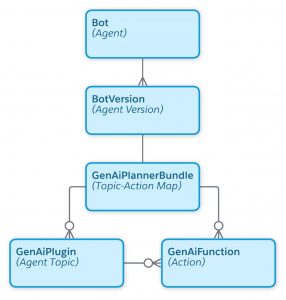
Salesforce exposes agents as multiple metadata entities rather than a single deployable unit (Agentforce DX Metadata).
Important Dependency Behavior
- Agent Versions do not appear as dropdown options in Change Sets. They can be included under Dependencies.
- GenAIPlannerDefinition/Bundle defines the agent logic (instructions, topics, actions), while the Bot Version manages activation and runtime configuration.
Recommended Order While Adding Components
Since dependency resolution is not always explicit, add components in this sequence:
- Generative AI Prompt Templates
- Generative AI Plugin Definition
- Generative AI Function Definition
- Generative AI Planner Definition
- AI Retriever Definition
- Bot (Versions can be added through the dependencies.)
Deployment Using package.xml (Workbench / CLI)
For repeatable deployments and CI/CD pipelines, the Metadata API deployment is preferred.
package.xml Structure
<?xml version=”1.0″ encoding=”UTF-8″ standalone=”yes”?>
<Package xmlns=”http://soap.sforce.com/2006/04/metadata”>
<types>
<members>*</members>
<name>GenAIPlanner</name>
</types>
<types>
<members>*</members>
<name>GenAIPlugin</name>
</types>
<types>
<members>*</members>
<name>GenAIFunction</name>
</types>
<types>
<members>*</members>
<name>GenAIPromptTemplate</name>
</types>
<types>
<members>*</members>
<name>Bot</name>
</types>
<types>
<members>*</members>
<name>BotVersion</name>
</types>
<version>65.0</version>
</Package>
These metadata types represent:
- Agent reasoning engine (GenAIPlanner)
- Action group / capability container (GenAIPlugin)
- Individual executable action (GenAIFunction)
- Prompt behavior (GenAIPromptTemplate)
- Agent container (Bot)
- Agent version (BotVersion)
Pre-Deployment Activities
These steps ensure deployment success.
1. Feature Enablement & Org Readiness
- Enable Agentforce, Prompt Builder, Generative AI, and Data Cloud.
- Enable Prompt Template Deployment (Navigate to Setup => Einstein Setup => In Prompt Builder Settings => Toggle ON Deploy Prompt Templates)
- Verify licenses and API version compatibility.
2. Data Cloud Configuration
- Ensure Data Cloud provisioning and permissions (Data Cloud Architect or Data Cloud User) are complete.
3. Supporting Metadata Availability
Deploy dependencies first if referenced by agents:
- Apex classes
- Flows
- Permission Sets (Agent access)
- Custom Objects/Fields used in prompts or actions
Post-Deployment Activities
Deployment only migrates metadata. The agent becomes functional only after completing the following manual steps.
1. Permissions & Access Setup
Assign permissions related to:
- Agentforce access
- Prompt Builder
- Generative AI usage
- Actions execution
- Data Cloud
Agent runtime execution depends on user permissions rather than deployment ownership.
2. Actions Validation
Validation | Required Action |
Apex-based action | Grant class access |
Flow-based action | Activate Flow |
External API action | Reauthorize credentials |
Named Credential | Reconnect authentication (Credentials are intentionally not migrated for security reasons.) |
3. Prompt Builder and Agent (Bot) Activation with Appropriate Version.
Drawbacks & Considerations
- Agent metadata works only with Metadata API v60+.
- Certain standard agents cannot be deployed and must be recreated manually.
Example :- Default Service Agent , Default Sales Agent - Referenced components like Apex, Flows or External services must be included in the deployment package or deployed beforehand.
- Deployment does not activate agents, activation must be done manually.
- Dependency order still matters even with Metadata API deployments.
- External Service or OpenAPI-based actions require External Service metadata deployment.
Best Practices (Recommended)
- Use package.xml for repeatability
- Always validate planner bundle deployment
- Maintain consistent API versions across orgs
- Test agent reasoning after deployment (not just metadata success)
Final Conclusion
Deploying Salesforce Agents is fundamentally different from deploying traditional Salesforce metadata. An Agent is not just a single component; it is a structured ecosystem consisting of:
- Planner (reasoning engine)
- Topics (intent grouping)
- Actions (execution layer)
- Prompts (LLM behavior)
- Versions (runtime configuration)
Change Sets provide a quick UI-based solution but hide critical dependencies, good for small-scale deployments.
package.xml deployments provide clarity, automation, and scalability, making them the preferred approach for modern DevOps teams.
If followed correctly, the steps in this guide allow developers to:
✔ Deploy agents consistently across environments
✔ Avoid missing dependencies
✔ Understand metadata relationships
✔ Build production-ready AI deployment pipelines
Author: Arushi Soni , Sai Bharath