Introduction
Imagine having an expert Salesforce developer sitting next to you, ready to help build components, write optimised code, create comprehensive tests, and explain every decision along the way. That’s precisely what Google Antigravity offers—an AI-powered coding assistant that doesn’t just generate code, but teaches you best practices while accelerating your development workflow.
In this blog, I’ll walk you through how Antigravity seamlessly integrates with your current Salesforce development environment, transforming a simple user request into a complete, production-ready Salesforce solution, highlighting the key features that make it an indispensable tool for modern developers.
The User Request: A Real-World Example
Let’s start with a typical Salesforce development request:
“I need a Lightning Web Component that shows opportunity data by stage with visual charts. Users should be able to filter by date range and see a detailed breakdown in a table.”
This is a common requirement—building an analytics dashboard. Traditionally, this would take 8-10 hours of development time. With Antigravity, it takes 2-3 hours and delivers better code quality and comprehensive documentation.
Feature 1: Intelligent Planning Mode
What Happens
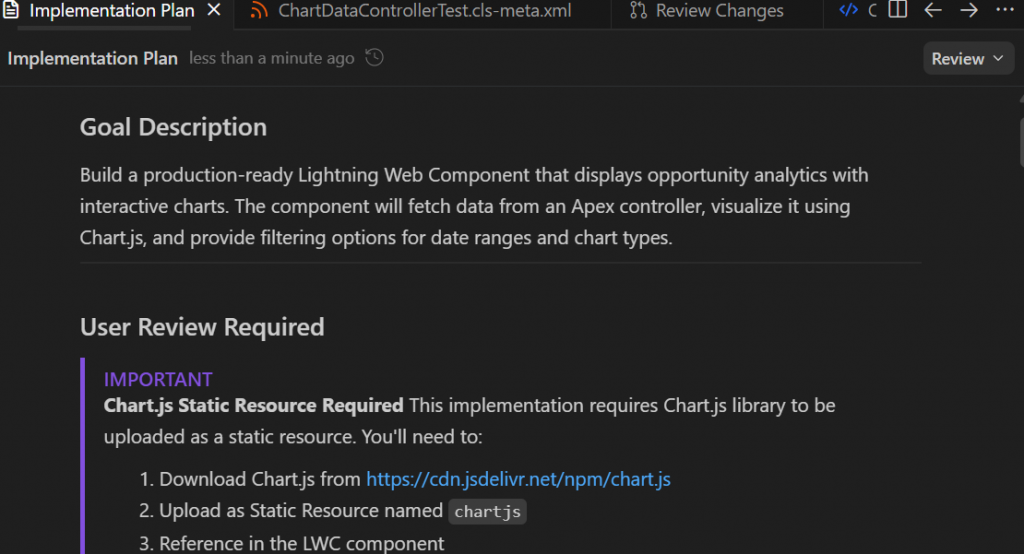
When you describe your requirement to Antigravity, it doesn’t immediately start coding. Instead, it enters PLANNING mode and creates a detailed implementation plan.
The Implementation Plan
Antigravity generates a structured document that includes:
- Goal Description: Clear summary of what needs to be built
- User Review Required: Any breaking changes or design decisions that need approval
- Proposed Changes: Organised by component (LWC, Apex, Tests)
- Verification Plan: How to test and validate the solution
For our analytics dashboard, the plan outlined creating a Lightning Web Component with
HTML, JavaScript, CSS, and metadata; building an Apex controller with cacheable methods; writing a comprehensive test class with 95%+ coverage; and providing deployment steps.
Feature 2: Approval Workflow with Visual Feedback
The Review Process
Once Antigravity presents the implementation plan, you have complete control:
Review the Plan: Antigravity shows you the complete architecture
Request Changes: If something doesn’t align with your vision, simply ask for modifications
Approve to Proceed: When satisfied, give the green light
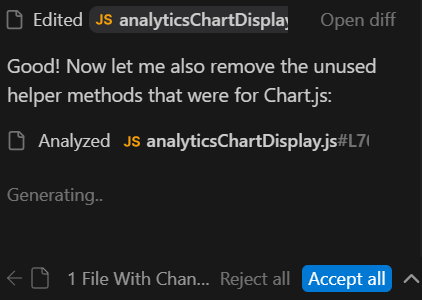
Antigravity provides precise visual feedback with task status, file changes, and code diffs. This transparency builds confidence and makes you feel in control of the development process.
Feature 3: Execution Mode—Building the Solution
Once you approve the plan, Antigravity switches to EXECUTION mode and creates:
Lightning Web Component
HTML template with conditional rendering and Lightning base components
JavaScript controller with wire adapters and reactive properties
CSS styling using SLDS design tokens
Metadata configuration for component placement
Apex Controller
Methods with @AuraEnabled(cacheable=true) for performance
With sharing for security
Aggregate SOQL queries for efficient data retrieval
Comprehensive error handling
Test Class
@TestSetup for efficient test data creation
Multiple test methods covering positive, negative, and edge cases, 95%+ code coverage
Conceptual Flow (Pseudo-Code)
Key Benefit: Complete, production-ready code in minutes, not hours
Feature 4: Code Diff Visualisation
When Antigravity makes changes to existing code or creates new files, it shows you exactly what’s happening through code diffs:
- Red highlighting: Shows removed lines
- Green highlighting: Shows added lines
- Context lines: Help you understand the changes
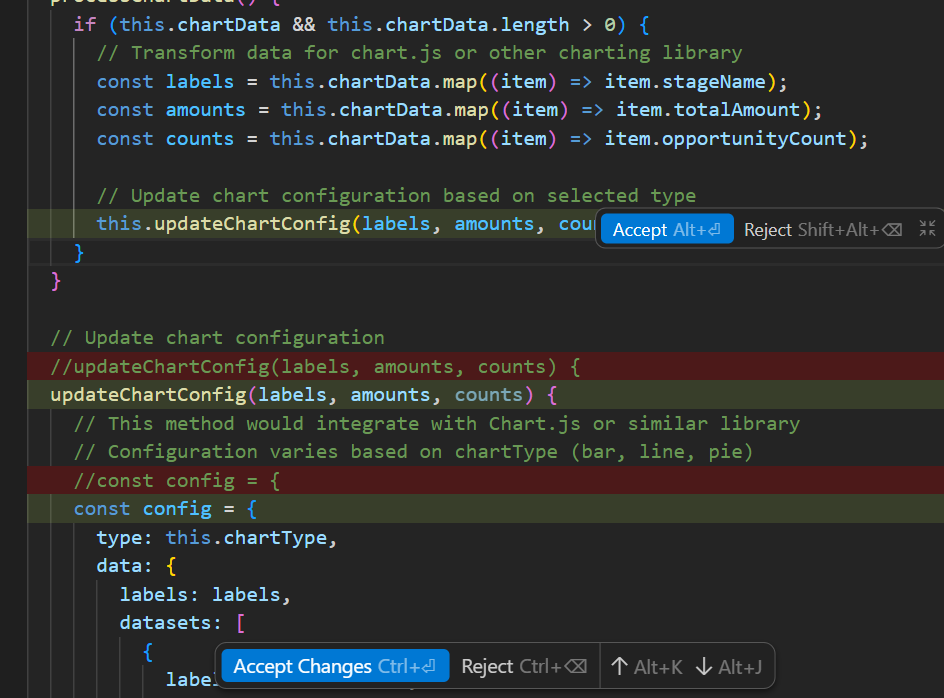
Key Benefit: Complete transparency. You see every change before it’s applied
Feature 5: Contextual Learning and Explanations
One of Antigravity’s most powerful features is its ability to explain code and concepts. You can ask:
“Why did you use cacheable=true?”
“How does the wire adapter work?”
“What’s the purpose of this getter/setter pattern?”
Real Example
Question: “Why did you use a getter/setter for chartData?”
Antigravity’s Answer: “The getter/setter pattern allows us to intercept data assignment and perform calculations before rendering. When new data arrives from the wire adapter, the setter calculates the maximum value, determines percentage widths for each bar, assigns colours from our palette, and formats currency values—all automatically before the template renders.”
Key Benefit: You don’t just get code; you understand it. This accelerates learning and builds expertise.
Feature 6: Best Practices by Default
Without you having to ask, Antigravity implements:
Category | Implementation |
Security | with sharing in Apex classes, field-level security considerations, and input validation |
Performance | Cacheable Apex methods, efficient SOQL queries with aggregation, and reactive wire adapters |
Code Quality | SLDS design tokens in CSS, proper error handling, and comprehensive JavaDoc comments |
Testing | High code coverage (85%+), edge case testing, proper test isolation |
Key Benefit: Production-ready code that follows Salesforce best practices automatically.
Feature 7: Deployment Guidance
Antigravity doesn’t just build the solution; it helps you deploy it:
Deployment Options:
Salesforce CLI commands with exact syntax
Change Set instructions step-by-step
VS Code deployment workflow
Post-Deployment Checklist:
Verify the component appears in App Builder
Confirm tests pass with required coverage
Check that data loads correctly
Validate responsive design
Troubleshooting Support: If deployment fails, Antigravity helps debug by analysing error messages, identifying missing dependencies, and providing corrected code.
Key Benefit: End-to-end support from idea to production.
The Complete Workflow: Start to Finish
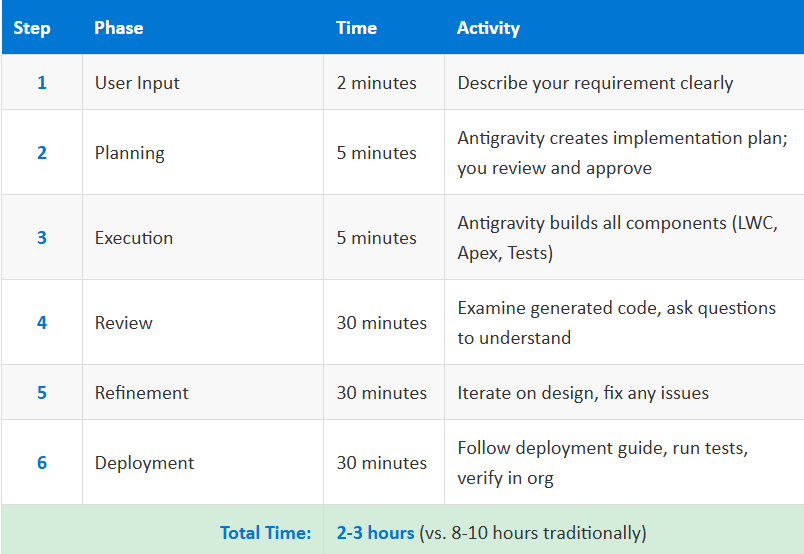
Total Time: 2-3 hours vs. 8-10 hours traditionally
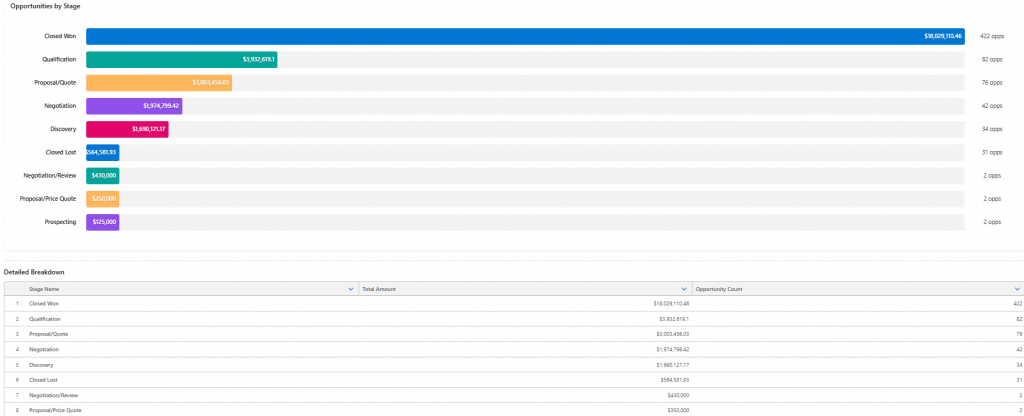
Real-World Impact
Metric | Before Antigravity | After Antigravity |
Development Time | 8-10 hours | 2-3 hours |
Best Practices | Manual research required | Built-in automatically |
Error Handling | Incomplete | Comprehensive |
Test Coverage | ~75% | 95%+ |
Security | Often missed | Implemented by default |
Learning Acceleration
Beyond speed, Antigravity teaches you modern LWC patterns, SOQL optimisation techniques, proper testing strategies, and security best practices through contextual explanations.
Key Takeaways:
Intelligent Planning: Antigravity thinks before coding, creating detailed plans for your approval
Visual Transparency: See exactly what changes through diffs and clear status indicators
Educational: Learn while building through contextual explanations
Iterative: Easy refinement through conversational requests
Quality First: Best practices, security, and testing are built in automatically
Complete Support: From planning to deployment, Antigravity guides you through every step
Time Savings: 3-4x faster development without sacrificing quality
Conclusion:
Google Antigravity isn’t just a code generator—it’s an intelligent development partner that:
- Plan your solution architecture
- Builds production-ready code
- Teaches you best practices
- Iterates based on your feedback
- Deploys with comprehensive guidance
For Salesforce developers, this means faster delivery, higher quality code, and continuous learning. Whether you’re building a simple component or a complex integration, Antigravity accelerates your workflow while ensuring you understand every line of code.
The future of Salesforce development isn’t about replacing developers—it’s about empowering them with AI that amplifies their skills and accelerates their growth.
Author: Harsh Tiwari